Overview
Have you begun using a new email address and want to change the email associated with your eCat account? No problem! Below you will find instructions on how to initiate that change for each type of user.
eCat iPad User
- Go to the gear menu in upper righthand corner of eCat.
- Select 'My Account'
- Select 'Update Email Address'
- Fill out form with current and new email addresses and submit. You will receive a confirmation message on the screen.
- You will need to confirm the new email address. A message will be sent to the new email address. Open that email and click the yellow 'Confirm Email Address' button.
- You will now receive an email to the old email address letting you know that it's been changed.
eCat Admin Console User
There are some users how have limited admin console access for certain functions (ie order processing) that don't also have admin access. This would be the process for those users.
- Login to Admin console. Go to 'My Account' in the upper right corner.
- Enter your new email addresses and confirm it. Click the 'Update Email Address' button. You will receive a confirmation message on the screen.
- You will need to confirm the new email address. A message will be sent to the new email address. Open that email and click the yellow 'Confirm Email Address' button.
- You will now receive an email to the old email address letting you know that it's been changed.
eCat Online User
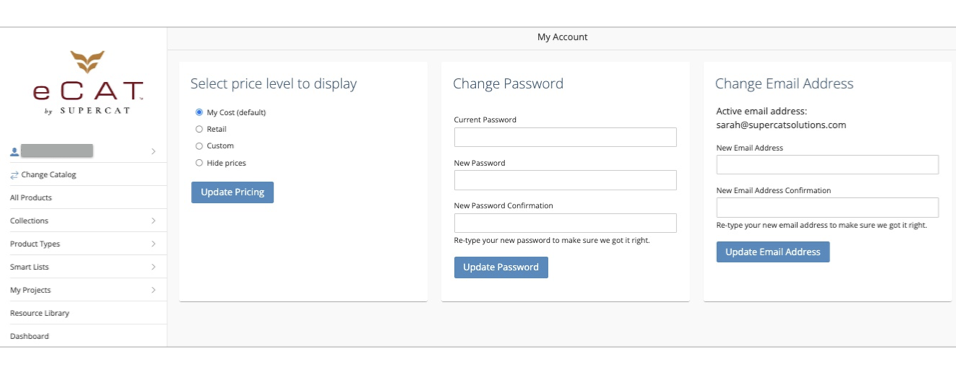
- While signed into eCat Online, click your name at the top of the left nav.
- Select 'My Account'
- You will see fields for changing password or changing email address.
- Under Change Email Address enter your new email and then a second time to confirm it.
- Click the blue 'Update Email Address' button. You will receive a confirmation message on the screen.
- You will need to confirm the new email address. A message will be sent to the new email address. Open that email and click the yellow 'Confirm Email Address' button.
- You will now receive an email to the old email address letting you know that it's been changed.